Variables
Variables are fundamental entities in EasyPLC programming, acting as the primary elements for operations such as comparisons, assignments, and logic control. Using descriptive variable names enhances the readability and maintainability of the control program.
Variable Integration
Variables can be categorized into two functional types:
- Linked Variables: Associated with internal PLC objects such as digital/analog I/O, counters, timers, or data blocks. These variables automatically inherit the data type of the linked element, and their type cannot be manually modified.
- Unlinked Variables: Managed entirely by the programmer for internal logic processing, storage, or intermediate calculations.
Supported Data Types
For unlinked variables, the following data types are available:
| Type | Description | Range / Bit Depth |
|---|---|---|
| bool | Logical value | true or false |
| int | 32-bit signed integer | from -2147483648 to 2147483647 |
| long | 64-bit signed integer | from -9223372036854775808 to 9223372036854775807 |
| float | 32-bit floating-point | from ≈±1.5 x 10^-45 to ≈±3.4 x 10^38 |
| double | 64-bit floating-point | from ≈±5.0×10^−324 to ±1.7×10^308 |
| string | unicode character sequence | text manipulation and assignment |
Addressing and Linking
Each variable supports an optional description field. Utilizing these descriptions is highly recommended to simplify the debugging process and clarify the intent of the logic.
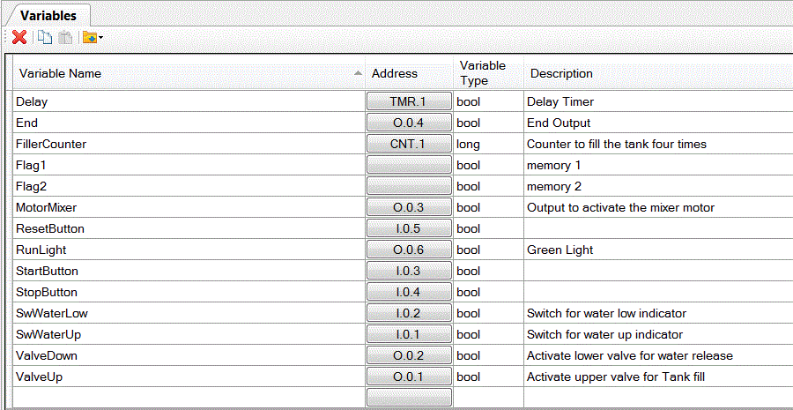
Documentation and Debugging
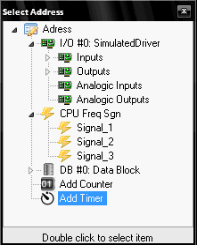
Clicking in the Address column of each variable allows for easy assignment to available PLC objects such as analog/digital I/O, CPU frequency signals, data blocks, counters, or timers. Once the column button is clicked, the Select Address window appears; a double-click selects the item to link with the variable.
Toolbar Operations
The Variable Manager includes specialized tools for efficient data handling:
- Delete/Copy/Paste: Standard editing functions for variable management.
- Import from Machines Simulator: Imports an .ios file to automatically generate variables for all digital and analog I/O defined in a specific simulation.
- Import from CSV: Supports bulk creation of variables using a text file. The file must follow the format: Name, Address, Type, Description. CSV Example:
Automatic;I.0.0;bool;variable for automatic mode
Manual;I.0.1;bool;variable for manual mode
Motor_ON;i.0.2;bool;motor is on
Motor_OFF;i.0.3;bool;motor is off
switch_1;i.0.4;bool;part detection
text;;string;user text
Technical Specifications
Variables represent storage locations in memory. Their values can be changed through assignment or using the ++ and -- operators.
Variable names follow C language criteria:
- Allowed: Can start with an underscore
_and contain both upper and lower case Unicode letters. Case is significant. - Prohibited: Cannot start with a numeral or a symbol, cannot use keyword names, and cannot exceed 511 characters.