Modules
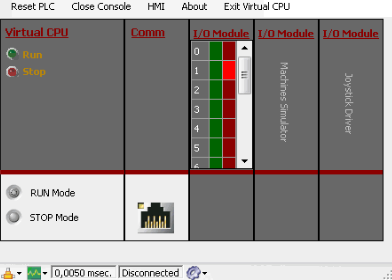
The Virtual PLC CPU interface displays all available modules within the project created in EasyPLC Editor. The CPU and Communication modules are always present.
Virtual CPU
The CPU module allows you to:
- View the current PLC operating mode.
- Toggle the PLC between Run and Stop modes.
Communication
The Communication module indicates the connection status with EasyPLC Editor:
- Yellow light in connector: EasyPLC Editor is not connected.
- Green Light: EasyPLC Editor connected.

To establish a remote connection with EasyPLC Editor, you must specify the IP address of the computer running the Virtual PLC CPU. Clicking the first icon on the Status Bar displays the available IP addresses, which must be configured in the Virtual PLC CPU node within the EasyPLC Hardware Project tree.
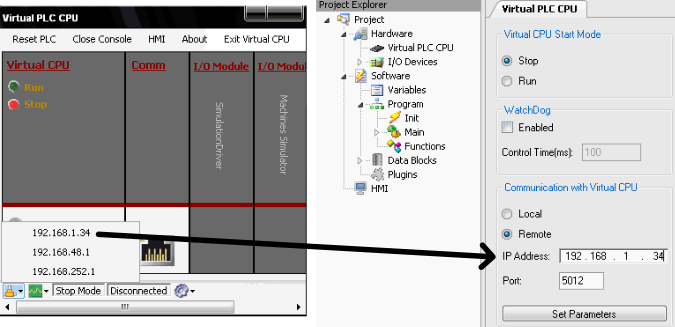
The current PLC connection mode is showed in the status bar.
I/O Modules
The interface also displays the I/O modules included in the project. When the Virtual PLC CPU is in Run mode, you can monitor I/O states by double-clicking the module's bottom area.
Additionally, clicking this area will display a status message regarding communication with the driver.